From line-height to 0.5px
A few days ago, I noticed a piece of code where the line-height (1.7rem) equaled the height (1.7rem), and the font-size was 1.1rem. On iOS devices, the text was vertically centered, but on Android devices, the top and bottom gaps differed by 1px (I couldn’t actually tell if it was exactly one pixel – I was guessing).
The Problem
A few days ago, I noticed a piece of code where the line-height (1.7rem) equaled the height (1.7rem), and the font-size was 1.1rem. On iOS devices, the text was vertically centered, but on Android devices, the top and bottom gaps differed by 1px (I couldn’t actually tell if it was exactly one pixel – I was guessing).
Why?
I spent a long time experimenting. I initially thought it was a font issue – after all, iOS uses its own custom-designed font, and even though my beloved Meizu also has its own custom font (as Bai Yongxiang would say: “that doesn’t really help”). Then I discovered that when I set the font-size to 1rem, the text appeared centered on Android, while on iOS it was always centered regardless. I was baffled.
Being the clever person I am, I looked up the device width of the Meizu MX5 (360px). Based on my page’s calculation, 1rem corresponds to 18px, so the actual line-height is 1.7rem = 1.7 * 18px = 30.6px, and the actual font-size is 1.1rem = 1.1 * 18px = 19.8px.
Since 1px is the minimum unit, how do these fractional pixel values get rounded – up, down, or to the nearest integer? I tested the character “林” on my MX5 with the following font sizes: 70, 70.4, 70.5, 70.6, and 71px. I then took screenshots and measured them in Photoshop. The heights were 71, 71, 71, 71, and 72 respectively. This proves that the browser rounds down. Don’t ask me why it’s 71 instead of 70 – I won’t tell you.
So here’s a solid explanation: line-height - font-size = (30 - 19)px = 11px. 11px can’t be split evenly between top and bottom, resulting in 5px on top and 6px on the bottom, which causes the text to shift upward. However, this doesn’t explain why iOS devices can split it evenly.
Let’s try the case where font-size is 1rem: line-height - font-size = (30 - 18)px = 12px. Each side gets 6px, so the text is centered.
0.5px
Today, while researching how to achieve 1px borders on retina devices, I accidentally discovered that iOS 8 and above supports 0.5px. That means on iOS 8 devices, the precision is 0.5px, so 11px divided by 2 gives 5.5px on each side – no wonder it can be vertically centered.
Rounding in iOS 8
So how do font sizes like 70.4, 70.5, and 70.6px get approximated on iOS 8 devices where the precision is 0.5px? The answer is: as long as it’s not a whole number, it all gets rounded to 70.5px. Can we call this “centered rounding”? Haha!
So Here’s the Real Question
How do you actually implement a true 1px border on retina screens for non-iOS 8 devices? Today I saw a sentence in a blog post that got me excited: 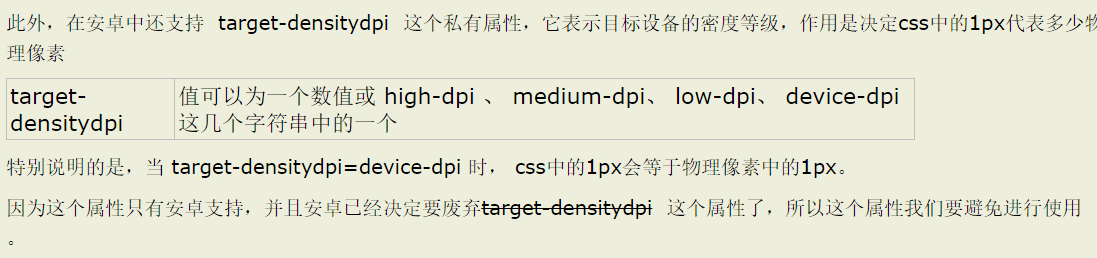
If only that last sentence weren’t there!
After searching for a long time, I found a decent approach:
Pseudo-elements + Transform
The idea is to remove the original element’s border, then use :before or :after to recreate the border and scale it down by half using transform. The original element uses relative positioning, while the new border uses absolute positioning.
Single border:
1 | .hairlines li{ |
Four borders:
1 | .hairlines li{ |
When using these styles, you need to combine them with JavaScript to detect whether it’s a Retina screen:
1 | if(window.devicePixelRatio && devicePixelRatio >= 2){ |
And the Follow-Up Question
Is there a better approach?
From line-height to 0.5px
http://quanru.github.io/2015/09/14/from-line-height-to-half-pixel