Best Practices for Git Workflows in Monorepo
No single Git workflow is a silver bullet. The right Git workflow often depends on the project’s code scale, number of collaborators, and use cases. This article starts with the Feature branch workflow suitable for small Monorepos, then covers the Trunk-based workflow for medium-to-large Monorepos, and provides selection criteria for reference. Hopefully, you’ll find the right Git workflow for your Monorepo!
Background
No single Git workflow is a silver bullet. The right Git workflow often depends on the project’s code scale, number of collaborators, and use cases. This article starts with the Feature branch workflow suitable for small Monorepos, then covers the Trunk-based workflow for medium-to-large Monorepos, and provides selection criteria for reference. Hopefully, you’ll find the right Git workflow for your Monorepo!
Prerequisites
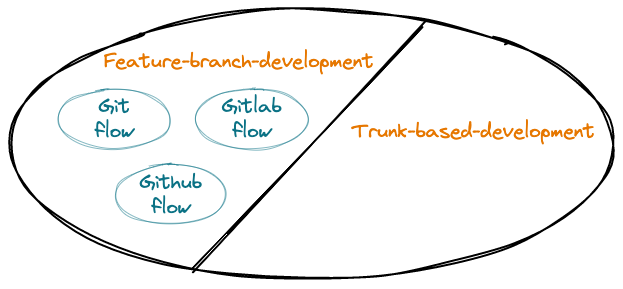
The Git workflows we’re most familiar with are Git flow, GitLab flow, and GitHub flow. Feature branch and trunk-based development are relatively newer concepts. How are they related?
Feature branch and Trunk-based workflows are relatively new concepts. They are opposite and mutually exclusive, forming a complete set;
Git flow, GitLab flow, and GitHub flow all belong to feature branch development. They share a common trait: they all use “feature-driven development,” meaning requirements are the starting point, followed by feature branches or hotfix branches;
Use Cases
In Monorepo projects using feature branch development, as the codebase complexity and team size grow, parallel “long-lived branches” also increase. When merging these branches into the trunk, conflicts or incompatibilities frequently arise, and manually resolving code conflicts often introduces bugs.
Trunk-based development encourages developers to create “short-lived branches” through small commits, greatly alleviating conflict issues and helping maintain smooth production releases.
In summary, choosing a workflow is not just about a series of operational tools—we often need to buy into the philosophy behind it. The following table shows the applicability of both workflow patterns across various dimensions:
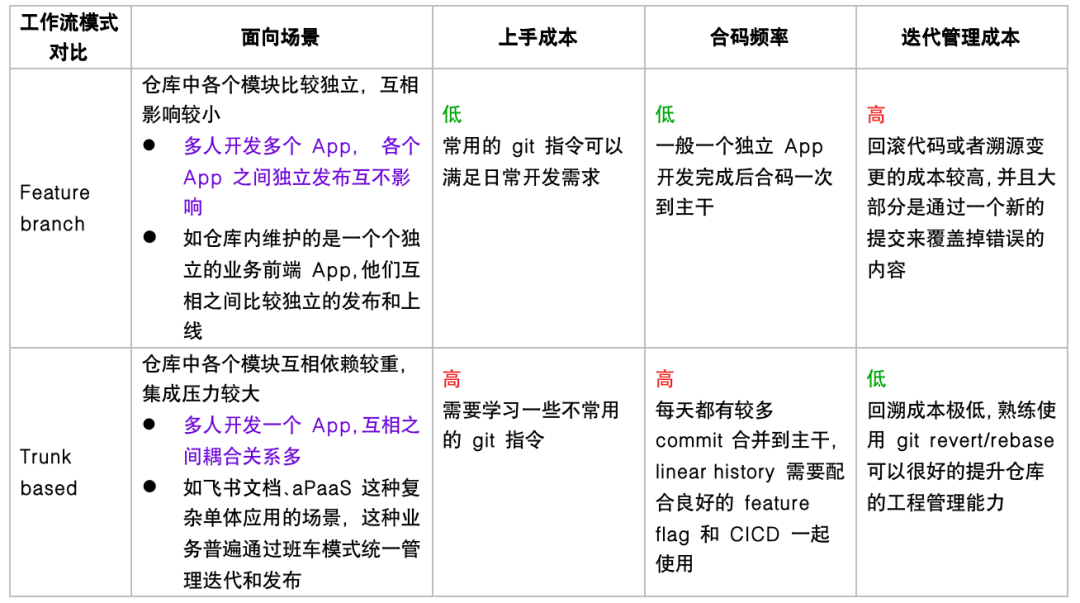
Most business scenarios currently use the feature branch development model. If your business involves multiple developers working on a monolithic application (like TikTok main app, Feishu Docs, etc.), you should try the Trunk-based development model, which improves overall repository engineering quality and management.
Deep Dive
Feature Branch Development
What is feature branch development?
- Definition
The core idea of “feature branch development” is that all feature development should happen in dedicated branches rather than the main branch. This encapsulation allows multiple developers to easily work on specific features without disturbing the main codebase. It also means the main branch never contains broken code, which is a huge advantage for continuous integration environments. – Git Feature Branch Workflow | Atlassian Git Tutorial
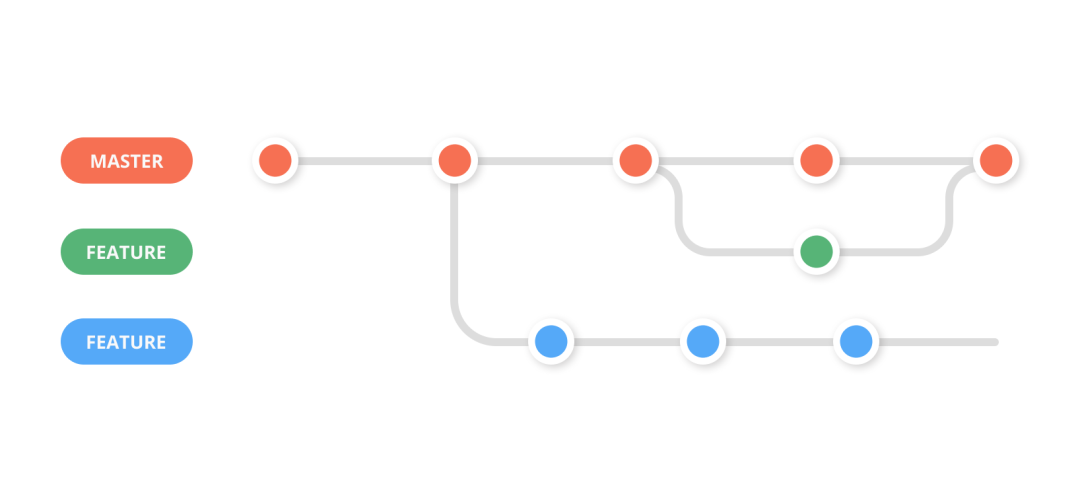
Create a feature branch from the master branch
Developers complete development work in the feature branch
Build the feature branch and notify QA for verification
If any issues are found
Developer creates a fix MR based on the feature branch
Through code review and merge process, merge the fix MR into the feature branch
Rebuild and deploy, then notify QA for re-verification
After QA verification passes, release the feature branch to production, then merge it into the trunk and delete it
Why use feature branch development?
Allows multiple developers to easily work on specific features without disturbing the main codebase.
The main branch never contains broken code, which is a huge advantage for continuous integration environments.
Only requires understanding simple operations to practice, no need to understand cherry-pick, feature flags, and other concepts.
Trunk-based Development
What is trunk-based development?
“Trunk-based development” is a version control management practice where developers merge small, frequent updates into the core “trunk” (usually the master branch).
This is a common practice among DevOps teams and part of the DevOps lifecycle, as it simplifies the merging and integration phases. In fact, it’s a required practice for CI/CD.
Compared to feature branch strategies with “long-lived branches,” developers can create “short-lived branches” through small commits. As codebase complexity and team size grow, trunk-based development helps maintain smooth production releases. – Trunk-based Development | Atlassian
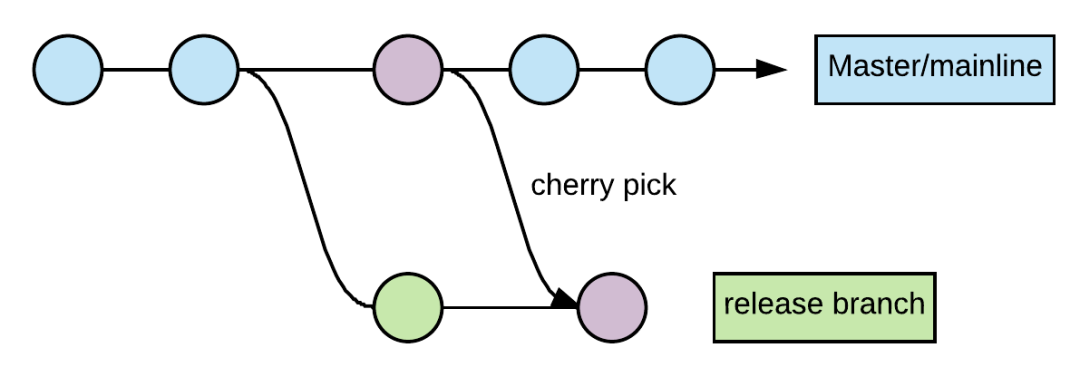
Release from deployment branch
Semi-automated process, suitable for low-frequency deployment and projects without comprehensive automated testing
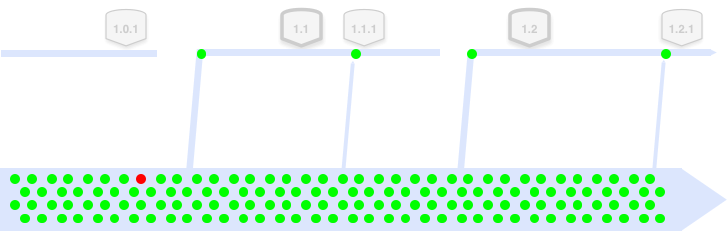
(A dot represents an MR merged into master. Green dots means good commits that passed e2e tests, and red dot means a buggy commit which should be avoided when deploying/rollback)
Create a deployment branch (RC) from the master branch
Build the deployment branch (RC) and notify QA for verification
If any issues are found
Developer creates a fix MR based on the master branch
Through code review and merge process, merge the fix MR into master
Cherry-pick commits to the deployment branch (RC), rebuild and deploy, then notify QA for re-verification
After QA verification passes, release the deployment branch (RC) to production, then delete the branch (RC)
Release from trunk branch
Fully automated process, suitable for high-frequency deployment and projects with comprehensive automated testing

(A dot represents an MR merged into master. Green dots means good commits that passed e2e tests, and red dot means a buggy commit which should be avoided when deploying/rollback)
Scheduled deployment: At specific times each day or hour, the deployment bot automatically finds the latest code that has passed all end-to-end tests (specific commit hash) and deploys it to production.
Continuous deployment: Whenever new code is merged into the trunk branch, the deployment bot automatically verifies whether the new code passes all end-to-end tests and is related to the project; if so, it automatically deploys to production.
Why use trunk-based development?
In trunk-based development, a steady stream of commits flows into the trunk branch. Adding automated test suites and code coverage monitoring for each commit enables continuous integration. When new code merges into the trunk, automated integration and code coverage tests run to verify code quality.
The fast, small commits of trunk-based development make code review a more efficient process. With small branches, developers can quickly review small changes. This is much easier than reviewers reading large code changes from long-lived feature branches.
Teams should merge into the main branch frequently throughout the day. Trunk-based development strives to keep the trunk branch “green,” meaning it can be deployed after every commit merge. Automated testing, code convergence, and code review ensure that trunk-based projects are always ready for production deployment.
Multi-person collaboration in large Monorepos is more prone to code conflicts, not only consuming significant human effort to resolve conflicts but also increasing the possibility of introducing bugs when “long-lived branches” merge into the “trunk.” Compared to feature branch strategies with “long-lived branches,” developers can iterate quickly through small commits creating “short-lived branches.” Therefore, as codebase complexity and team size grow, trunk-based development can still ensure smooth multi-person collaboration.
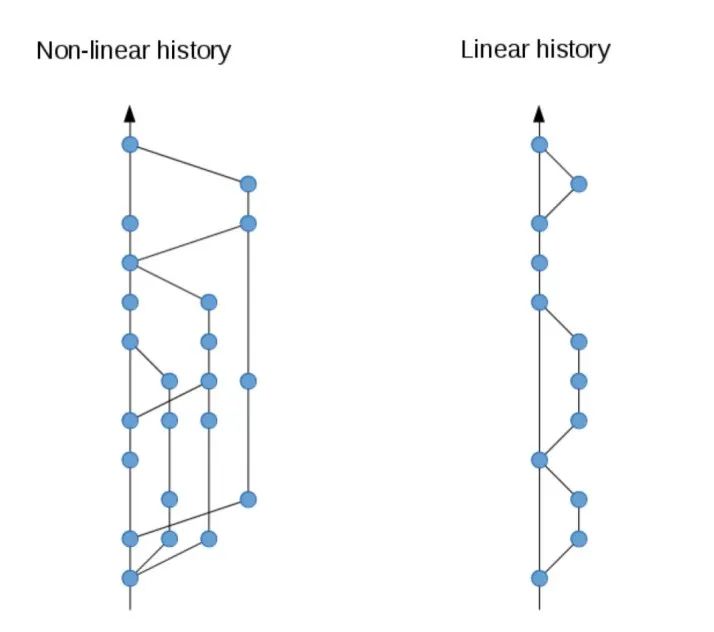
Trunk-based development makes it easier to achieve linear commit history, which has several benefits:
Easy to view and track history
Easy to trace changes, e.g., Was Feature A introduced before or after Bugfix B?
Easy to debug, e.g., Using Git bisect for binary search, which is difficult with non-linear history
Easy to revert changes, e.g., When you find a problematic commit, simply revert the corresponding commit. Non-linear history has many cross-branch merges making reverts difficult
Two Prerequisites for Effectiveness
Before and after each code merge, developers need to know what impact their code has on the trunk, making continuous integration and testing capabilities indispensable.
Since trunk-based development breaks large features into small changes, for features that are not yet complete but partially merged into the trunk, we need feature flags to prevent premature exposure to users.
Feature flags are typically an independent control system. Production code has two sets of logic, and real-time reading of feature flag values determines whether to hide or expose certain features. Usually, we turn on a feature flag after deploying all code related to that feature. Then, when the feature is stable and permanently added to the product, we remove the feature flag and related logic code.
References
- A tidy, linear Git history: https://www.bitsnbites.eu/a-tidy-linear-git-history/
Best Practices for Git Workflows in Monorepo
http://quanru.github.io/2022/12/31/Best-Practices-for-Git-Workflows-in-Monorepo