What Actually Happens Inside a Single Midscene aiAct Call?
The previous post, Why Does Midscene’s UI Agent Need to See the Screen?, explained why Midscene puts “look at the screenshot” at the very front of every UI action. Right after that explanation, I usually get the next question from coworkers:
“OK, but what actually runs inside
aiAct? When I write a singleagent.aiAct('log in and place an order'), what really happens? Is it just one model call?”
It is not one call. It is a loop with feedback.
This post takes that loop apart: how the screenshot is grabbed, what the AI returns, when the loop stops, and how context flows across rounds.
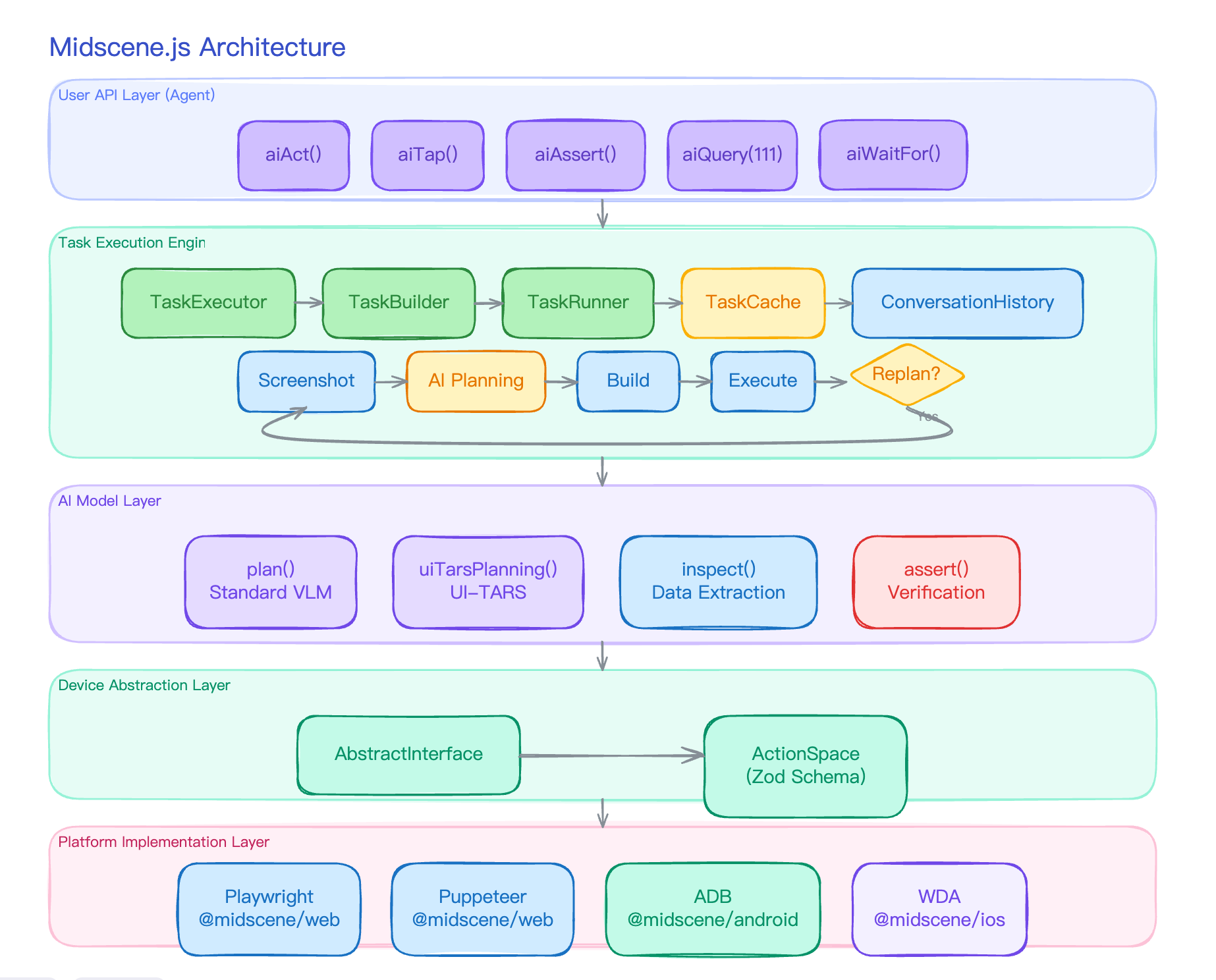
aiAct Is Not a Single Model Call
When people first see a vision-based Agent, they tend to assume it works like this:
1 | user says "log in and place an order" |
If the UI is static enough, “plan once, execute in batch” can in theory work. But real UIs do not behave that way: clicking the login button changes the page, the cart only shows up after navigation, whether the cart has items depends on backend state, popups can cover the main flow, and error toasts only appear after they appear.
So aiAct is internally a plan-act-replan loop:
1 | ┌─ screenshot ─┐ |
Every round of the loop starts from a fresh screenshot, so the AI gets to see what the previous action actually did before deciding the next move. The loop runs until the AI itself says “I’m done”, or until the round limit is reached.
The next sections take these five steps apart one by one.
Step 1: Grab a Screenshot
This step is plain, but one detail is worth mentioning: screenshots are not taken every time someone “wants one”.
TaskRunner holds a 300 ms screenshot cache. What it caches is the whole UIContext (screenshot + page size + element info), not just a PNG. The rule boils down to one phrase — read/write separation:
- Tasks that do things (planning, locating, tapping/typing) reuse the same frame within 300 ms — the image was just captured, so the locate and action that follow use it directly instead of each firing its own
page.screenshot(). - Tasks that make judgments (
aiQuery,aiAssert,aiWaitFor— all classified asInsightin the code) force a fresh screenshot — a judgment has to be based on the latest UI after the previous action, and a stale frame would mislead it.
The deciding line is exactly one: forceRefresh = task.type === 'Insight'. So “reuse” isn’t indiscriminate; it happens precisely and only on execution tasks.
The cache itself is platform-agnostic, but the redundant captures it saves are most noticeable on mobile: pulling a single screenshot via adb shell screencap on Android costs hundreds of milliseconds. If every subtask in the same round captured its own, the whole loop would be unusably slow. On Web page.screenshot() is faster, but skipping redundant captures still pays off.
Step 2: Let the Model Plan the Next Step
With the screenshot in hand, the planning module sends “screenshot + original user prompt + action catalog + conversation history” to the VLM and asks it to return what to do this round.
The response is not JSON. It is XML. A typical response looks like:
1 | <thought>There is a blue "Sign in" button in the top right corner; I need to click it</thought> |
Why XML instead of JSON? It’s a boring-looking decision that has saved us from countless silent failures.
Here’s what VLM-emitted JSON looks like in the wild — the model stuffs unescaped quotes into a string, drops a closing one, or even misspells a field name:
1 | { |
Those unescaped quotes around "Sign in" make the parser think the string ended at the blue , and everything after it falls apart; locte is a misspelled field on top of that. JSON is all-or-nothing — one bad spot and the whole round’s plan is wasted, and you only find out next round when the AI notices the screen didn’t change.
XML is different. It’s tag-bounded, extracted tag by tag (extractXMLTag(xml, "thought")): whatever noise sits inside one tag, however broken its indentation or quoting, none of it stops the next tag from being pulled out cleanly. A broken <thought> doesn’t stop <action-type> from being read.
And XML doesn’t throw away structured data — the action-param-json field is real JSON, it just sits inside an XML tag and is parsed separately with safeParseJson(). Even if that JSON breaks, it only damages that one action’s params; it doesn’t corrupt the thought, log, or memory in the rest of the response.
In one line: the choice of format is a robustness lever, not a matter of taste — pick the one most tolerant of the mistakes your producer tends to make. VLMs love to drop stray characters into free text, so wrap each field in a tag and isolate it; the day models emit airtight output, the choice could flip back.
After parsing, the structure is normalized into a PlanningAIResponse with a few key fields:
actions: the array of actions for this round (note: the AI actually returns the singularaction; normalization renames it to plural)thought,log,memory: thinking, logs, things to remember (these feed intoConversationHistory, covered below)shouldContinuePlanning: the loop’s exit switch — should we go for another round
How is shouldContinuePlanning decided? By whether the AI returned a <complete> tag:
1 | <thought>All the operations requested by the user are complete</thought> |
If the AI says “complete” at the end, the loop exits; otherwise it continues by default. The decision of “when to stop” is handed to the model, not hardcoded as a rule. That choice matters and will come up again below.
Step 3: Translate the Plan into Executable Tasks
The actions the AI returns are not directly runnable. They look like:
1 | { type: "Tap", param: { locate: { prompt: "sign in button", bbox: [...] } } } |
There are two reasons they cannot run as-is:
- The
bboxis not accurate enough — it is an estimate the AI handed back while planning, possibly off by tens of pixels. For small buttons, trusting it directly means clicking the wrong thing. - Different actions have very different param shapes —
Taptakeslocate,Inputtakeslocate + value + mode,DragAndDroptakes twolocatefields,AndroidBackButtontakes no params at all.
So a TaskBuilder sits in between, breaking each abstract PlanningAction into concrete ExecutionTaskApply[]. For a simple Tap:
1 | Tap{ locate, bbox } → [ LocateTask, TapActionTask ] |
The Locate task turns “sign in button” into a precise pixel coordinate; only then does the Tap task actually click. This split is one of the most important engineering decisions in Midscene, but unpacking it here would steal the show — the next post, Why Midscene Splits Locate and Action into Two Steps, is dedicated to it.
For now, you only need to know: planning does not lead straight to execution. It goes through “action decomposition” first, where every field that needs locating becomes a standalone Locate task.
Step 4: Execute Tasks in Order
After decomposition you get a flat array. TaskRunner runs them one by one, with a small state machine per task:
1 | pending → running → finished / failed |
Tasks pass state through a simple “context handoff”: once a Locate task finishes, it fills the param.locate field on the next Action task (via an onResult callback). So when the Tap task actually runs, it sees a precise coordinate, not the AI’s rough bbox.
What about failures? Failure is also a signal — the task is marked failed, but the loop does not necessarily stop. The failure is pushed into the conversation history, and the next round lets the AI look at the screenshot and decide for itself whether to retry, switch strategies, or give up. That hands the decision to the model again, instead of fighting it with try/catch.
Step 5: Do We Go Around Again?
This step has exactly one check: shouldContinuePlanning === true continues, false exits.
There is also a safety net — a loop-count ceiling. The limit differs per model:
| Model type | Max loop iterations |
|---|---|
| Standard VLM (Qwen, Gemini, GPT-4V) | 20 |
| UI-TARS | 40 |
| AutoGLM | 100 |
Why 20 for standard VLMs? Because these models are not trained for long-chain planning; past 20 rounds they’re mostly spinning in place. UI-TARS is trained by ByteDance specifically for GUI tasks, so its planning chains are longer and more stable — hence 40. AutoGLM uses a different paradigm where each AI decision is finer-grained, so it gets 100.
The point of this ceiling is not “to prevent unfinished tasks”. It is to prevent the AI from hallucinating endless next steps it can’t escape.
Across Rounds: How Does the AI Know What Happened Before?
That closes the loop, but one question remains: how does round 2’s planning know what round 1 already did?
The answer is ConversationHistory — a conversation context manager owned by TaskExecutor. It tracks five things:
messages: the LLM-standard conversation history (each round’s screenshot + AI response is appended)memories: things the AI itself decided to remembersubGoals: the sub-goal list in deepThink modehistoricalLogs: in non-deepThink mode, the cross-round record of executed stepspendingFeedbackMessage: feedback for the next round (last step’s success/failure, error info, etc.)
subGoals and historicalLogs are complementary: with deepThink the former tracks “what I plan to do”; without it, the latter tracks “what I have done”.
Every aiAct() call resets the history (each invocation gets a fresh ConversationHistory). In other words, two independent aiAct() calls share no context. This is on purpose: each aiAct is a bounded task, not a long-running chat.
But across multiple rounds inside a single aiAct() call, context accumulates — round 2’s planning sees round 1’s screenshot, the AI’s earlier words, and what was actually executed.
What If the Screenshots Get Too Big?
There is an engineering problem here: stuffing a fresh screenshot into the history every round will blow up tokens fast. A 1280×720 screenshot is tens of KB after base64, several thousand tokens, and five or six rounds will saturate the context window.
Midscene handles this with snapshot(maxImages): counting back from the end of the message list, only the last N screenshots are kept; older ones are replaced with the placeholder (image ignored due to size optimization).
- Normal mode N=1, only the latest screenshot is kept
- deepThink mode N=2, the latest two are kept so the AI can compare “before vs after”
On top of that, compressHistory(50, 20) — when the message count crosses 50, only the most recent 20 survive. With both mechanisms layered, the loop can run a dozen-plus iterations without tokens running away.
The Whole Picture
Stringing all five steps together, a single aiAct("type Midscene in the search box and click search") runs roughly like this:
1 | Round 1 |
This loop skeleton is the heart of Midscene’s engineering. Everything else — caching, deepThink, deepLocate, model freedom — is a layer added on top of this skeleton.
Wrap-up
aiAct does not hand the whole task to the model in one shot. It translates the natural human “look → think → act → look again” cycle into a program loop:
- Screenshot gives the model the real current UI state, refreshed every round
- Plan uses XML to have the model return the next action + whether to continue
- Decompose turns abstract actions into “locate first, then execute”
- Execute runs them in order, chained by callbacks
- Replan lets the model decide when to stop, with a hard ceiling as backup
- ConversationHistory carries screenshots and context across rounds, with image-count limits to keep tokens in check
The natural follow-up is the single most important stop in the loop — “find the element”. Why is the AI’s bbox not precise enough? How does the four-level Fallback chain climb from “free estimate” all the way to “expensive precise locate”? That is the topic of the next post: Why Midscene Splits Locate and Action into Two Steps.
What Actually Happens Inside a Single Midscene aiAct Call?
http://quanru.github.io/2026/05/26/What-Actually-Happens-Inside-a-Midscene-aiAct