Why Does Midscene's UI Agent Need to See the Screen?
While working on Midscene, I often run into the same question: why does a UI Agent need screenshots? Why not keep using DOM, selectors, XPath, accessibility trees, and the other things traditional automation has already made mature?
It is a fair question. For more than a decade, UI automation has mostly grown around structured interface data. But if we are not trying to build just a smarter Web testing framework, and instead want a UI Agent that can operate Web pages, mobile apps, desktop apps, Canvas, and custom devices, the default input has to shift a little: see the screen first, then decide what to do.
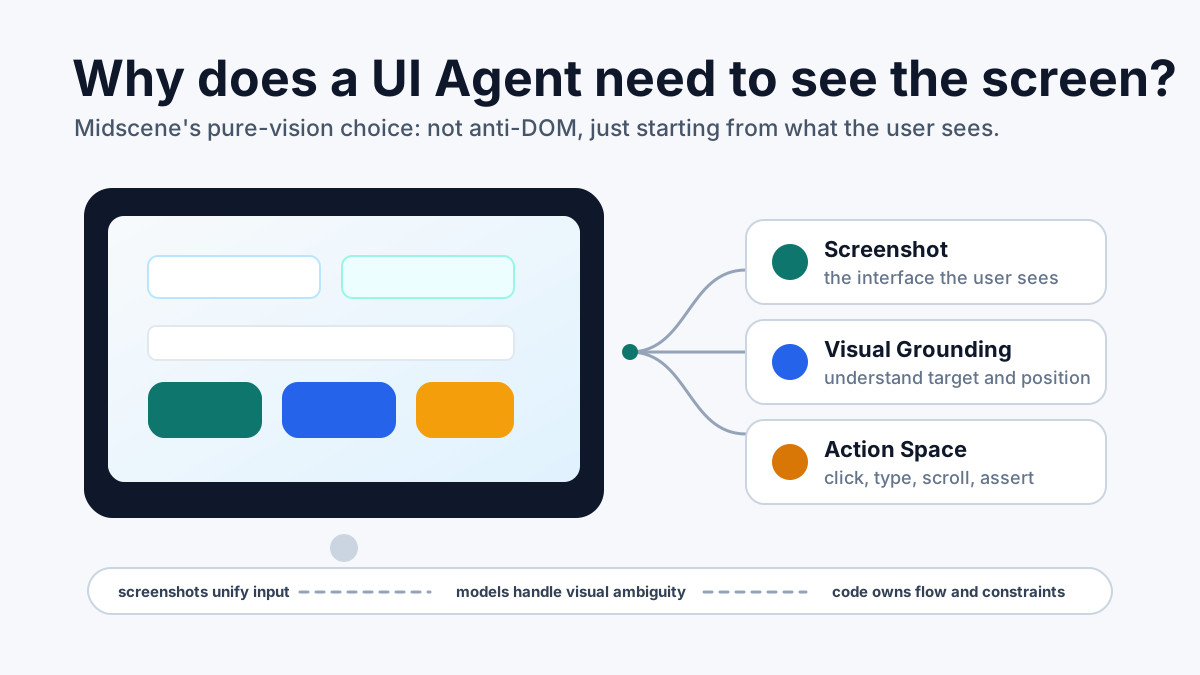
We did not start with blind faith in vision
Let me state the conclusion first: Midscene did not choose pure vision because it sounded more “AI”.
In the early days, Midscene tried both DOM-based locating and vision-based locating. DOM works well on many Web pages, especially when the structure is stable, the semantics are clear, and selectors are maintainable. But in real projects, the awkward cases keep showing up: controls inside Canvas, visual objects drawn with CSS background images, cross-origin iframes, Shadow DOM, virtual lists, custom-rendered components, and elements with incomplete accessibility metadata. Any of these can create a gap between the DOM and what the user actually sees.
The worst part of that gap is not a single failed run. It is the debugging loop it creates. Did the model misunderstand the task? Did the DOM return the wrong thing? Does the node exist but remain invisible? Has the visual state already changed?
Starting from version 1.0, Midscene took the pure-vision path for UI operation and element locating: locating and interaction are mainly driven by screenshots. DOM was not thrown away. It is still useful for data extraction, page understanding, caching, and optimization. It is just no longer the default basis for UI operation.
This is not a posture. It is a plain engineering choice: if a UI Agent is going to operate on behalf of a user, it should at least see what the user sees.
The screen.
DOM is implementation structure; the screen is the result
Many Web engineers naturally trust the DOM. It is searchable, programmable, debuggable, and it has been the most important building block of traditional automation.
But DOM is not the UI itself. It is one implementation structure behind the UI.
Users do not open DevTools to decide where a button is. They see visual objects on the current screen: buttons, inputs, dialogs, overlays, error messages, selected states, disabled states, layout relationships, and surrounding context.
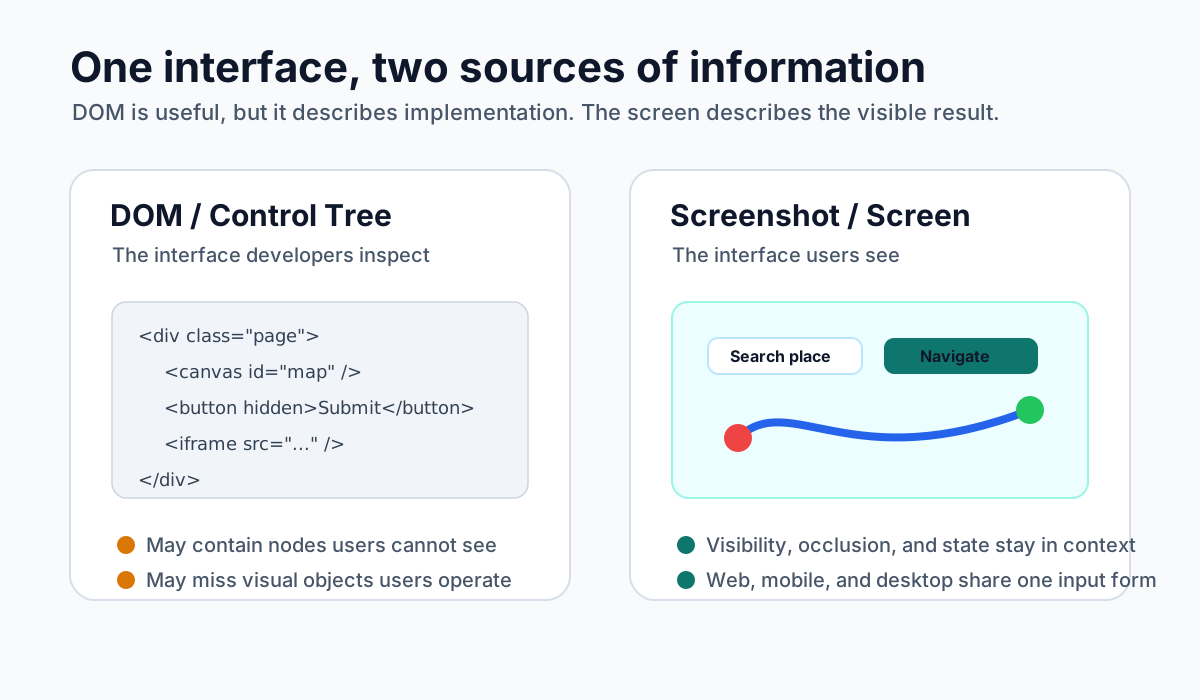
These two views often match, but not always.
A node may exist in the DOM while being hidden, collapsed, or covered by another layer. The user cannot see it. On the other hand, a perfectly clear control on the screen may not have a usable DOM node at all: Canvas, maps, whiteboards, charts, game interfaces, remote desktops, and many custom-rendered controls all fall into this bucket.
Once a UI Agent trusts the DOM by default, it is no longer understanding “the interface the user sees”. It is understanding “the interface inside DevTools”. That may be fine for traditional Web automation, but the limitation shows up quickly for a general UI Agent.
Because the Agent’s job is not to traverse a structure tree. Its job is to complete an operation from the user’s point of view.
Screenshots become easier to unify across platforms
If we only cared about the Web, DOM-first would remain a reasonable long-term choice.
Real software usage is broader than browsers: Android, iOS, desktop apps, browser extensions, remote desktops, vehicle screens, IoT devices, internal enterprise tools, Canvas apps, and WebGL apps all come with different interface stacks.
The Web has the DOM. Android has the view hierarchy. iOS has the accessibility tree. Desktop apps have window trees and accessibility APIs. A custom-rendered interface may not expose a stable structure at all.
If every platform needs its own structural vocabulary for the Agent, the Agent will always be tied to the platform.
A screenshot is the easier common input.
As long as we can capture the current screen, we can ask the same set of questions: What state is the interface in? What actionable objects can the user see? Where is the target element? Where should the next click, input, or scroll happen? After the action, did the interface enter the expected state?
That is why Midscene uses screenshots as the core input. The device adapters underneath are still different: screenshotting, clicking, typing, and scrolling are implemented differently on Web, Android, iOS, and desktop. But from the upper Agent layer’s perspective, it receives the same kind of input: a visible interface, plus a constrained set of actions.
The hard part is not clicking. It is finding.
In UI automation, actions like click, input, scroll, and key press are not hard by themselves.
The trouble is usually in “finding”:
- Which submit button is currently usable?
- Which input belongs to this step of the flow?
- Which row in the list is the target record?
- Is a dialog blocking the main flow?
- Is the button disabled or clickable right now?
- Did the page really navigate successfully?
- Is the error message about bad user input, or is the system state wrong?
Humans answer these questions almost instantly because humans look at the screen.
Traditional automation can also answer them, but often with selectors, wait conditions, business assertions, special branches, retry logic, and a lot of fallback code. The value of a UI Agent is exactly here: it turns the parts that previously depended on human visual judgment into visual understanding that a model can handle.
So Midscene is not wrapping “click” as an AI capability. It is trying to make visual locating and visual state judgment reliable enough to use in real automation.
Pure vision is an engineering trade-off, not a demo line
“Operate the interface with screenshots only” can sound like a demo pitch: look, no DOM, still clicking buttons.
For Midscene, the more important value of pure vision is that it gives the system cleaner interfaces and responsibilities.
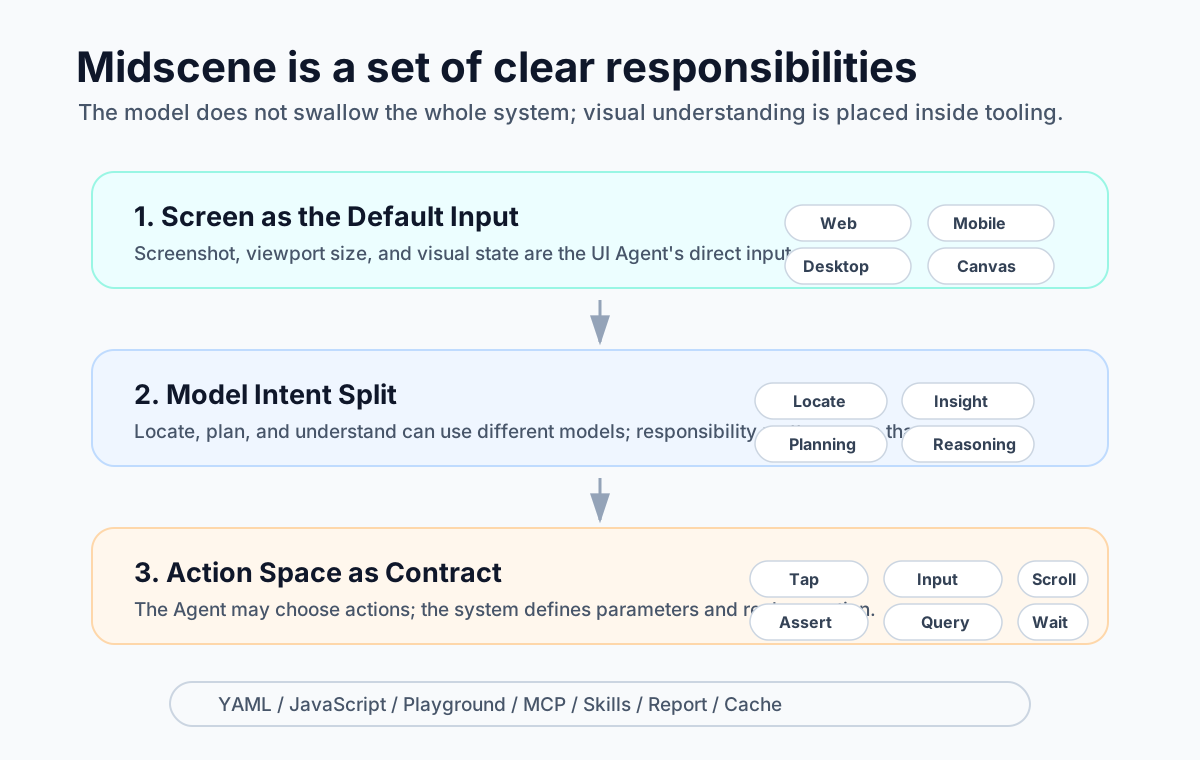
If UI operation depends on DOM, Midscene is still essentially a Web automation enhancement. If UI operation depends on every platform’s own control tree, each platform needs a different abstraction. If UI operation starts from screenshots by default, Web, mobile, desktop, and custom devices can share the same operation semantics.
The benefit is concrete:
- The same kind of API can work across platforms.
- The same Agent abstraction can attach to different devices.
- The same report format can replay operations from different platforms.
- The same MCP / Skills capabilities can be exposed to upper-level Agents.
- Developers do not need to understand the target platform’s internal structure before writing automation.
This does not mean platform differences disappear. It means platform differences are handled in the device adapter layer: the adapter captures screenshots and executes real actions, while the upper Agent looks at the image, understands the goal, and chooses the action.
In other words, Midscene is not building a model that is good at writing selectors. It is building a system that can operate interfaces from the user’s point of view.
DOM still has a place, just not the default one
Pure vision does not mean rejecting DOM.
DOM is still valuable in many cases, especially these:
- Data extraction: when reading image URLs, hidden fields, structured lists, or invisible attributes, DOM is often more direct than screenshots.
- Extra context: when visual information is insufficient, DOM can provide additional context for page understanding.
- Performance optimization: on the Web, if some element structures are stable, XPath or similar information can cache located elements and reduce repeated model calls.
- Deterministic fallback: when a business already has stable selectors, they can absolutely be connected as deterministic capabilities.
So the question is not “should we use DOM?” The question is “when should we use DOM?”
Midscene’s choice is: screenshots match what the user sees; DOM is optional context. Both can be used, but the default input for UI operation should first respect the visible interface.
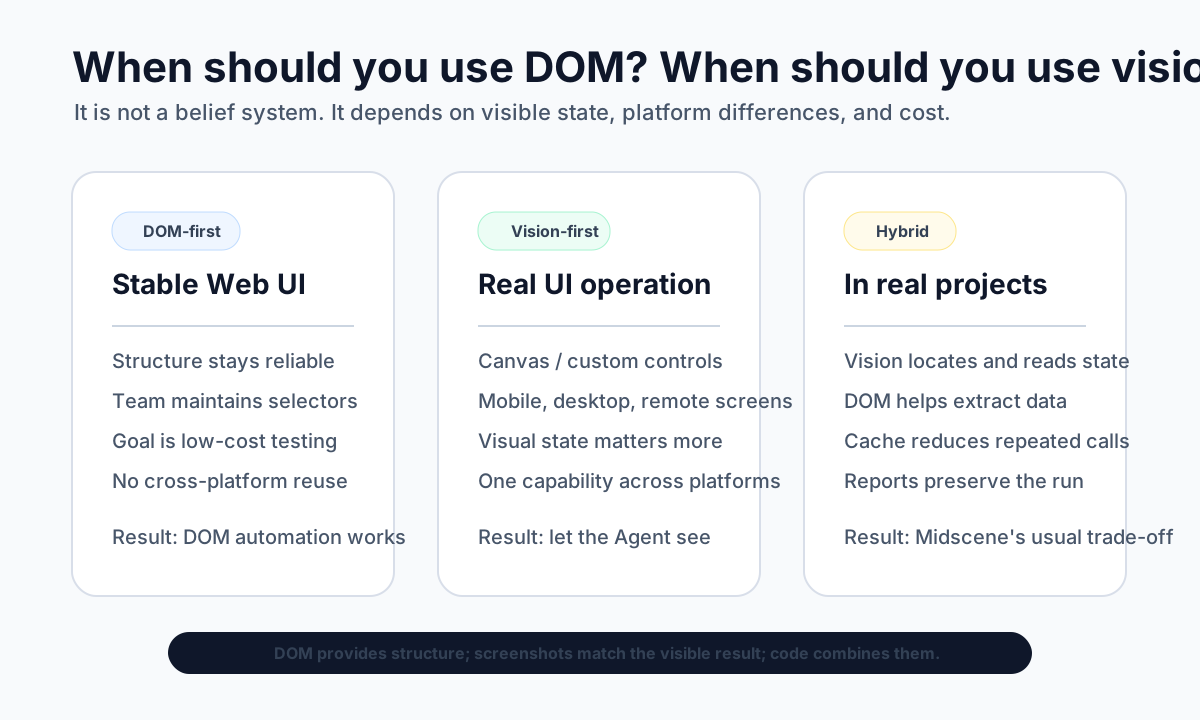
This changes how automation code is organized
Once the core of a UI Agent becomes “seeing the screen”, the way we write automation also changes.
In the past, automation authors had to care about selector stability, XPath changes, node visibility, which DOM state to wait for, and which attribute in a mobile control tree was reliable.
With Midscene, the more natural expressions become: click the “Log in” button, type keywords into the “Search” box, check whether the page shows an error message, extract product names from the current list, scroll to the record that contains a certain value.
This is not handing every engineering problem to natural language. It is a different split of responsibilities:
- Code handles the deterministic parts: flows, loops, branches, retries, timeouts, CI integration, and report archiving.
- The model handles the parts that used to depend most on human eyes: seeing the screen, finding elements, reading states, and understanding visual semantics.
- The action space provides constraints: the Agent can choose actions, but the action set, parameter structure, and real execution are defined by the system.
- Reports and cache preserve the process: runs can be replayed, and stable paths can be reused.
This is why Midscene provides a JavaScript SDK, YAML, Playground, reports, cache, MCP, and Skills. A UI Agent that can be used in projects for the long run should not be just “a large model that can operate a page”. It should be a toolchain that developers can debug, reuse, and integrate.
A UI Agent should not live only in DevTools
The more I work on this, the more I feel that the biggest difference between a UI Agent and traditional UI automation is not whether it can use natural language.
The bigger difference is this: traditional automation feels like operating the interface’s internal structure, while a UI Agent should feel like operating the interface the user sees.
That affects many design choices. Should DOM be the default? Should the system work across platforms? Should it support Canvas and desktop apps? Should it record screenshots, actions, model calls, and errors? Should upper-level Agents call UI capabilities through a unified tool interface?
Many Midscene design choices come back to the same judgment: if an Agent is going to operate for the user, it has to see what the user sees first.
The screen.
A simple rule of thumb
If your goal is to automate a structurally stable Web page, and your team can maintain selectors over time, traditional DOM automation is still excellent. It is fast, cheap, deterministic, and mature.
But if your goal is to operate across Web, mobile, and desktop, handle Canvas, custom controls, and complex visual states, let an Agent work against the real interface a user sees, expose UI operation to scripts, Playground, MCP, and Skills, and stop binding automation to one rendering technology, then the UI Agent needs to see the screen first.
To put it simply:
DOM is the interface as developers inspect it. Screenshots are the interface as users see it.
If a UI Agent is going to operate for the user, it cannot live only inside DevTools.
Why Does Midscene's UI Agent Need to See the Screen?
http://quanru.github.io/2026/05/26/Why-Does-a-UI-Agent-Need-to-See-the-Screen